
Interpreting results
Last updated on 2025-11-04 | Edit this page
Overview
Questions
- When do I start assessing and making informed decisions from the data/insights from user experience research?
- How do I quickly but effectively label, define, sort and summarise my data?
- Who could I involve in user experience research data and how to go about that?
- How might I structure informed design decisions/assertions based on my data?
- When do I stop interpreting data and collecting data?
Objectives
- Interpreting and synthesizing best practice
- Label qualitative data
- Cluster/sort qualitative data into meaningful themes
- Apply interpretations and assertions on your understanding of the user experience research data
- Who can support or be involved in data understanding
- Working with and understanding transcription files and notes
- Determine when data collection can end
Start making sense of your user experience research data
Synthesis/interpreting is a stage of user experience research in which you read, analyse, compare, organize and reorganize information to make sense of what you observed and heard.
Because our short-term memories tend to degrade with time, it’s advised to do interpreting of data as quickly after conducting the data collection as possible. Some may choose to interpret after all data is collected and some may choose to interpret and apply any processes to data after each data collection session with user participants.
When working with transcriptions and notes, either digital notes or hand-written notes, even if we have impeccable speed and detail, some context and detail is likely missed or forgotten. This is why it’s advisable to automate transcription using technology tools and start to interpret and synthesise data quickly or at least go back over notes and clarify any details that may be misconstrued at a later date. We also advise taking time to ‘debrief’ with yourself post any data collection with user participants. Steve Portigal has a useful and adaptable debrief worksheet that is available in his book ‘Interviewing Users: How to Uncover Compelling Insights’.
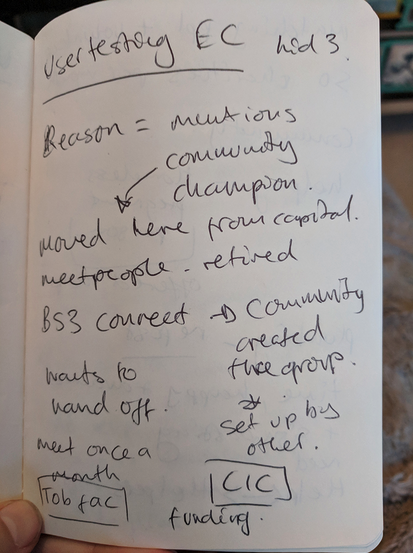
Caption: An example image of rough notes taken during a user experience research test session. There are lots of shortened words, arrows, words spread across the page , words circled and the handwriting is hard to read.
Invite an additional person if you want to, it isn’t essential to have more people interpreting results but it can mean that aspects you didn’t pick up on can be caught by additional people. We recommend either someone with less context of the overall user experience research to ask probing questions or someone with similar/the same context as yourself so they can be aligned with you and help you define and sort. Be aware that adding additional people into the process of interpreting and synthesis will increase the time it takes to make assertions and judgements about the data. Weight this time taken against the value of different perspectives and understanding.
It’s important to work synchronously, either together in a room or an online call. As always, without seeing your collaborators’ faces it can be hard to communicate complex and inferred information. In addition to video/audio, you will need a space where you’ll write together and then read together is vitally important. If you’re working face to face, you can write on sticky notes and stick them on a wall. If you’re working virtually, there are whiteboard tools like Miro.com, Mural.com, Google Jamboard, or even online spreadsheets. There are also open source virtual whiteboards, like Excalidraw and Penpot. Whichever tool you use, each person’s sticky notes should be visible to and moveable by everyone.
Tip:In-line text tools like Google Docs and collaborative writing programs don’t offer a good way to move notes freely on a canvas, and therefore we don’t recommend using those for synthesis (though it can be done if you are persistent!).
Remember, user experience research doesn’t mean putting an individual user (or group of users) in charge of your decision making. During a test, if a user says, “Oh you should have functionality that does exactly this thing I’ll explain” it doesn’t mean that you are required to build it. Instead, you just learned that the user is looking for a solution that your open source scientific software doesn’t offer at all, or in the way they expect. It’s less about the exact requested specifications and more about analyzing their problem (alongside other users’ problems) to land on an achievable, inclusive solution.
Find a fellow open source scientific software builder. Discuss who you might invite to help you collect and/or understand and interpret data. What kind of support could they offer? If you don’t know any people that you would ask for help, begin to discuss what kind of person you’d find valuable to have supporting you.
Challenge
Take a look at the following ‘raw’ transcription of a user speaking in a user experience research session. Go through and highlight (bold, underline, italic, change the colour) of the text to pick out the elements that you think are most important to the goal.
Goal: Where are our users of our plant computer visioning OSS finding the most problems in their processes and where can we help them complete their unique tasks towards their research best?
Transcription: Starting working with the plant computer vision tool for my research work In 2017, I got the money from my institution to invest some…well a tiny amount of time, my time, to figuring out how to get it working for us and how we like, keep plants and study plants and when i first started i tried just running it as it is and i had loads of errors and problems. I asked around the comp sci dept for help and a few people, nice people, offered to help and afterwards I started looking at documentation and guides. A few people had made guides for people having problems and that was helpful. I printed those umm docs out, maybe well i know I took notes on them in pen but i think I lost those docs now. My lab started putting pressure on me and I was out in the field taking samples and I tried using it out and about after taking photos but I realized I needed to know what it’s called like when you do data changing like oh! Cleaning the images like cleaning data. Preparing the photos to be ingested by the OSS. In 2018 - really dove into python packaging and tried to understand the prompts more, now people might say “oh i’m having trouble with pip install” and i would help people use the -v verbose command. Some of the commands and guides really don’t make sense at first and need lots of testing. We’ve never got people to.
Label and define findings and insights
There are numerous published methodologies for labelling, defining and sorting data from user experience research. Some are more accessible than others and there is no ‘one fits all’ process for interpreting and analysing data. Before interpreting and synthesizing, it’s worth clarifying who your user is, what your research question is and the goals of your user experience research. Having these as constant reminders as you label and define will help you later when sorting and clustering.
The labeling, defining, sorting and clustering process starts by getting all the user data together. Put each problem, comment, insight or observation a separate sticky note. The data will be rearranged in the sorting and clustering episode, so it’s important that each statement has its own sticky note. Statements should be a maximum of 10 words if possible.
Optional: Add critical information to your sticky notes with relevant criteria such as participant number, geographical location, device type, or anything else that’s important to your OSS tool. This is helpful to see if any patterns emerge based on specific attributes. E.g. Every Mac user wasn’t able to complete the checkout process.
We’ve listed some of the methodologies below but we’ll continue the lesson using thematic analysis/networks as the advised method for those learning.
Challenge
Take a look at the following data from users during user experience research. Add labels to the data from what you can see as important.
Goal: Where are our users of our plant computer visioning OSS finding the most problems in their processes and where can we help them complete their unique tasks towards their research best?
| User data | Labels | Comments |
|---|---|---|
| Ester had an error when running the server for the plant computer vision OSS. She spent some time scrolling through the messages in her terminal and performed the common two more times. She took a look in her folder window and noticed the python package manager. She then realised she had not started the python environment. | #sequence of steps #starting workflow #error messages #terminal #python #memory recall #asking for help | Ester also had a note stuck to her desk about investigating python package managers Ester also joked that she would usually ask her friend, a software developer, in the computing dept. For help if she can’t figure out an error. |
| When Ester tried to process an image, she first opened up an image she described as a ‘measurement’ image. She went on to describe this image as one of the first photos she took during her research that she did multiple processes on to ‘correct’ the image before processing - she used to have a list of how to ‘process’ and ‘test’ an image but she now knows instinctively how to ‘fix’ an image. She likes to look at this particular image every so often when she does her work to ‘remind’ her how an image should look. | #sequence of steps #standards | Ester flicked back to the ‘measurement’ image twice in the 30 mins we spoke about her main work flows. |
| Ester showed us how she uses certain functions and commands to generate the charts, diagrams, histograms, plots etc. she needs for her research. She showed us the ways she’s adapted her workflows to make sure that color correction of water-based plants is done prior to using the OSS but when it comes to thermal data she needed to adapt and change the existing functions to account for ambient water temperature. Here she showed us the different ‘hacks’ she’s made in order to do her research but she’s still ‘not sure’ that this is completely accurate. Often she relies on some other thermal images and tries to ‘skip’ to the plotting parts. | Add your answer here | Ester reminds us that she is ultimately looking at what combinations of underwater plants help maintain the health of low depth fresh water systems. |
A story from working on user research in OSS For one project, we did qualitative (interviews) and quantitative research (survey) with various types of users. Unfortunately, after the synthesis was done we realized that we made a critical error in our survey - one question was not specific to the part of the tool we were focusing on.
This meant that some of our sticky notes were giving us a false impression. We’d have to go back to the raw data and analyze which product the respondents were referring to. Luckily we had tagged each sticky note with the source and alias of the person. This made it easy to target the data points in question and remove the ones that were not part of our research goal.
While we still kept that data, it was important to keep the focus targeted - we couldn’t synthesize both parts at the same time! We needed to keep it manageable for our sanity and time constraints. Another thing we did on this project was to color code the sticky notes: green for positive insights, yellow for neutral insights, and red for negative insights.
At the end it was helpful to see the hotspots of positive and negative areas to get a vision of what areas needed the most improvement.
Sort and cluster findings and insights
You could stop at thematic analysis/networks if you believe you have gained clear insights that can help you make those assertive design decisions. If you’d like to continue exploring the data then leveraging a clustering method like Affinity Diagramming is advised.
Affinity Diagramming The visible clustering of observations and insights into meaningful categories and relationships. Capture research insights, observations, concerns, or requirements on individual sticky notes. Rather than grouping notes into predefined categories, details are clustered, which then give rise to named themes based on shared affinity of similar intent, issues, or problems.
Tagging your sticky notes with relevant criteria such as participant number, geographical location, device type, or anything else that’s important to your OSS tool can help you identify themes or critical information. This is helpful to see if any patterns emerge based on specific attributes. E.g. Every Mac user wasn’t able to complete the checkout process
All the sticky notes should be on the collaborative whiteboard where you’re working. It looks pretty chaotic and messy, but don’t worry, that’s completely normal. By organizing and grouping data together, we can start to see the structure of a problem or insight.
You are going to look for commonalities between the problems, comments, insights and observations. Every person will read a sticky note and move it close to other related sticky notes. It doesn’t matter where you start as long as you don’t spend too much time in detailed discussion about a single sticky note. You can always move sticky notes if you find later there’s a better grouping.
Label each theme cluster to make it easier to identify. These can be a description of the users’ actions, like ‘sign-up registration’, or a more abstract theme such as ‘Fairness’ and ‘Equality’. By the end, you’ll have a collection of sticky notes arranged in a hub and spoke pattern, with the hubs being your theme labels.
After you’ve moved each sticky note into a cluster, you can start a slower and more detailed second round of review. Pay attention to any big cluster groups. Can these be broken down into smaller clusters by being more specific with how you name the theme? Similarly, review very small groups of 1-3 sticky notes - they might fit into other groups. It can be difficult to not expand into thinking of solutions or implementation when synthesising but this is not (yet) the time for that.
You can also change the theme title to a descriptive statement. This is part of storytelling and important for communicating back to the wider OSS community and also can inform how you write issues or tasks from a user point of view.
Remember to be careful when factual information collected from user research becomes your own interpretation. You want to avoid making any assumptions. If you find yourself making a lot of assumptions, that’s a sign you need to re-test these elements with users to get clarification.
A story from working on user research in OSS We thought we had set up everything to make our synthesis session quick and easy. We had the sticky notes, the space, the time, and the people. The one thing we overlooked was setting up our people for success.
Our group was diverse, not only in terms of background, but also role: developer, designer, product manager, community manager, and CEO. Our conversation was based on instinct and it became contentious, confusing, and frustrating. The team had fiercely-held opinions and their agenda and reasoning wasn’t always clear - we lacked the context and thought process of everyone’s ideas. For the next affinity diagramming session, we decided to establish rules for framing “I like” statements. Participants would need to add context: “From a business perspective, I like X.” Or give more reasoning: “I like X because it gives the user the most freedom.” Or reference the goals: “I think X achieves our goal of making the process simpler.” When we clearly defined how we wanted people to participate in a synthesis discussion it went a lot smoother!
Challenge
Take a look at the following themes around the labels and data. What would you add to the list of themes? Feel free to move some labels around if you feel they need to be moved according to your judgement and add a comment as to why.
Goal: Where are our users of our plant computer visioning OSS finding the most problems in their processes and where can we help them complete their unique tasks towards their research best?
| Labels | Theme | Comments |
|---|---|---|
| #sequence of steps #starting workflow #memory recall #asking for help | Workflow/Process | These labels have a common theme of the steps that Ester takes to go through a process |
| #standards | Standards/Benchmarking | This label refers to how our user (Ester) is understanding whether subsequent ways of using the OSS tool are similar/the same results as previously. This is how she measures ‘quality’ and ‘consistency’ and how she is confident in her process and results. |
| #error messages #hacks | Problem solving | Errors and hacks can be summarised into the state they provoke ‘problem solving’. Whether or not the problem is solved or not they tend to distract the user until a ‘hack’ is discovered or they revert to a work-around. Errors and problem solving should be minimised and help can be offered. |
| #memory recall #asking for help #guessing | Add your answer here | Add your answer here |
| #terminal #python | Add your answer here | Add your answer here |
| #graphs #plots #diagrams | Add your answer here | Add your answer here |
Interpreting and asserting your understanding on user experience research data
After these processes of reading, discussing, labelling, defining, sorting and theming you should be closer to some discovery moments from your users around your open source scientific software goals.
What comes next is taking these insights into informed, assertive design-related statements and ideas. The next episode will dive into the topic of prioritisation and alignment with any project, institution or research objectives or roadmaps.
Following a format that draws on the insight and words the user needs, user scenario or user problem can help you put into actionable problems what you heard from users. It’s important to avoid ‘solutioneering’ and stay focused on what problems the user is facing in what scenario, how that relates to the constraints of the open source scientific software that you maintain and how that relates to your overarching goals or research questions. User statements aim to summarise what users want to be able to do and are typically used to bridge user experience design research with defining requirements for software development.
User scenarios, as they are typically called, have a number of different online templates and ways to construct them. We’ve developed an adapted template that includes what is important to open source software projects and also scientific/academic research.
Example short user statement As a phD researcher researching the effects of complimentary underwater plant ecosystems on the health of those water-ecosystems, I want to have my photos quickly colour corrected according to a flexible standard that takes into account water depth and clarity effects, So that I am able to focus on creating plots, graphs and data assertions that help me to explore my research question.
You can also explore these as more detailed feature and function level user statements.
Example short user statement at a feature/function level As a PhD researcher researching the effects of complimentary underwater plant ecosystems on the health of those water-ecosystems, I want to have my most commonly used commands and prompts to be able to be queried/seen when I input a specific command/prompt. So that I am able to remember and re-use the same commands after periods away from my computer.
As you may have noticed, the basic structure is:
As a… the type of user and what they primarily do or are focused on I want to… what is their goal? need? frustration? Task? So that I… can do something better/more efficient/more successful than previously or do a new critical action/function
Challenge
Using these user experience research insights, labels and themes, fill in the template of a user focussed statement.
Goal: Where are our users of our plant computer visioning OSS finding the most problems in their processes and where can we help them complete their unique tasks towards their research best?
| Insight | When Ester tried to process an image, she first opened up an image she described as a ‘measurement’ image. She went on to describe this image as one of the first photos she took during her research that she did multiple processes on to ‘correct’ the image before processing - she used to have a list of how to ‘process’ and ‘test’ an image but she now knows instinctively how to ‘fix’ an image. She likes to look at this particular image every so often when she does her work to ‘remind’ her how an image should look. |
|---|---|
| Labels Themes | #hacks #standards #benchmarking #error avoidance Problem solving, Processes, Optimisation |
| User statement | As a PhD researcher researching the effects of complimentary underwater plant ecosystems on the health of those water-ecosystems, I want to be confident that the image I’m using are ‘good’ examples measured against an example/baseline image and be certain of that image accuracy So that I can process images without double checking and being concerned about the accuracy and more confident. |
| Any constraints or details about the OSS that must be considered | Adding baseline/benchmarking images in the core OSS code for every kind of plant image would be a big ask. Adding guidelines for contributions upstream would be more possible. |
| How does it meet/relate back to your own user experience research goals and/or research question? | This insight tells us a key worry from this user, and possibly other users in that they are not sure that their images are being treated like-for-like. Increasing confidence can help users save time and speed up processes. |
Your template
Goal:
| Insight | Add your answer here |
|---|---|
| User statement | Add your answer here |
| Labels Themes | Add your answer here |
| Any constraints or details about the OSS that must be considered | Add your answer here |
| How does it meet/relate back to your own user experience research goals and/or research question? | Add your answer here |
Ending the interpretation and understanding stage of user experience research
Like most phases of user experience research it can be difficult to know when the optimal place to ‘stop’ is. When you feel like you have enough data that has been labelled, sorted and interpreted to your satisfaction so you can make confident and clear design decisions about your project is a good place to stop. This might not mean you have all data, 100% labelled, 100% clustered and 100% interpreted but if you have ‘good enough’ then it’s worth moving on.
What open source can offer that’s unique in this regard is, making as much of your data and process openly documented as possible means that other contributors, maintainers and people interested in continuing the project can do that if they have the time and the inclination.
Start making sense of your user experience research data
- Synthesis/interpreting is a stage of user experience research in which you read, analyse, compare, organize and reorganize information to make sense of it.
- Start this stage as early as possible to avoid memory degradation of the data you’ve collected.
- Ensure your notes and transcriptions are accurate and understandable as soon as you can.
- Decide if you’d like to include more people in the process of interpreting and synthesising data.
- Set up your interpreting/synthesis space by collecting data in one place, preferably on individual sticky notes and/or cells of a spreadsheet.
Label and define findings and insights
- Ensuring your user experience ‘data’ is collected into short individual statements will help with labelling processes.
- Following a labelling methodology can either be the common repeating words and themes in a users’ data, your interpretations and observations along these themes and involve the definition and expressions from the users of the tasks completed.
Sort and cluster findings and insights
- Clustering and sorting processes like Affinity Diagramming help you to further distill learnings from your user experience research data in the form of ‘themes’
- Be careful that any process of understanding, sorting and clustering doesn’t mean you’re inferring incorrect meaning on user experience research data.
- Ensure you offer clarity and explanation around the themes you extract and how it relates back to your goal or does not relate back to your goal and therefore are not as critical for your work. This also helps when making clear and transparent OSS documentation about your user experience research.
Interpreting and asserting your understanding on user experience research data
- Interpreting results can follow a number of methods, ones that work best for you and your project needs, goals and roadmap. Making sure those interpretations refer back to users, their needs and the labels and themes you’ve identified helps others, when looking at your interpretations, see the deduction journey you took from source (user) to interpretation.
Ending the interpretation and understanding stage of user experience research
- You set the ‘definition of done’ for when the interpretation process is complete.
- Consider making your process open and accessible in whatever state of compilation that they are. This means potential open source contributors can get involved.